
idealista
idealistaHouse & Home
4.81.21K Reviews
- Version
- 15.3.0
- Installs
- 10.00M
- Age Rating
- Everyone
Screenshots
Our Review of idealista
 Analysis by Appyee
When I search for a home, the hardest part is often not finding listings but deciding which ones deserve my time. idealista is most useful to me as a way to narrow a wide property search by place and practical needs, then judge the remaining options on a map. It is a free House & Home app from idealista, focused on property searches in Spain, Italy and Portugal. That geographic focus matters: if you are looking in one of those countries, it gives you a dedicated place to browse; if you are searching elsewhere, it is not the tool I would start with.
Why the map changes the search
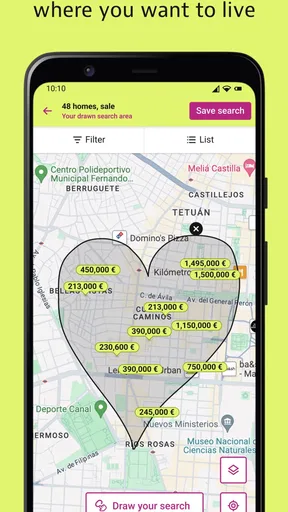
Property details can look appealing in isolation, but location is often what makes a home workable. A map view helps me connect a listing to the area around it rather than treating the address as a line of text. I can zoom in, compare where several options sit, and notice when a seemingly attractive result is outside the part of town I actually want. That makes the map more than a visual extra: it helps me screen for fit before I spend time weighing every photo and description.
The app is popular with people searching in its three markets, and its average rating is 4.8 from around 441,000 ratings. It has been installed over 10 million times, so it is a familiar starting point for many property hunters. Those figures tell me it has broad reach, but they do not replace the work of checking each listing carefully. A busy marketplace can surface useful choices and still require patience.
First Impressions and Navigation
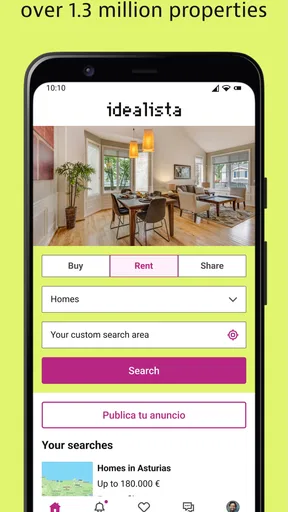
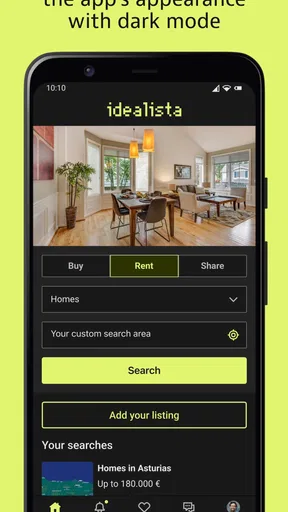
Upon firing up idealista, the first thing that struck me was the clean, intuitive design. It’s like the app knew exactly what I wanted to see and how I wanted to see it. The home screen is straightforward, with options to search for properties, view saved listings, and manage your account. No clutter, just what you need.
Navigation is a breeze. The search function is particularly robust, allowing you to filter results by a plethora of preferences—price, location, number of bedrooms, and even specific amenities like a pool or parking. It's like having a real estate agent in your pocket!
Features That Stand Out
One of the standout features is the map view. I’m a visual person, so being able to see properties plotted on a map was super helpful. You can easily zoom in to specific neighborhoods and see what's available around each corner. Plus, the app updates in real-time, so you’re always in the loop.
The detailed listings are another highlight. Each property comes with high-quality photos, comprehensive descriptions, and essential info like square footage and monthly costs. Some listings even include a virtual tour, which is perfect for those of us who like to explore from the comfort of our couch.
Making a shortlist that helps in real life
Once I have a rough idea of the area, I use filters to keep the results tied to the way I will actually live. A bedroom count is easy to compare, but combining it with location and budget is more revealing: it can show whether I need to compromise on space, distance, or a feature such as parking. I would avoid stacking every preference at the start, though. If the map looks empty, loosening one filter at a time makes it easier to see which requirement is doing the most narrowing.
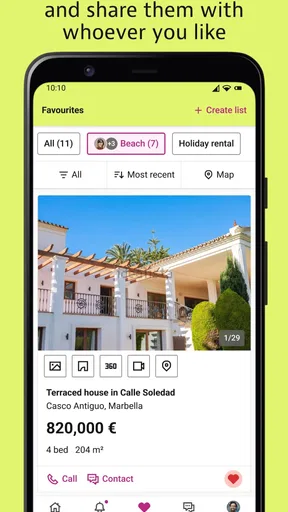
Saved listings are most useful when they are treated as a working shortlist, not a collection of homes I liked at a glance. I would separate serious candidates from uncertain ones and revisit the details side by side. A note to myself about why a listing made the cut—its location, layout, or a cost that seems manageable—can prevent a polished photo from dominating the decision later. The app helps me keep options together; the actual comparison still needs my own judgment.
A realistic way to use it during a move
Imagine I am relocating and have only a loose idea of where I want to live. I can begin with a broad search, use the map to identify clusters of listings near the areas I am considering, and then narrow by budget and space. After saving a few plausible choices, I can revisit them when I have time to check the descriptions and photos more carefully. That is a more useful rhythm than opening isolated listings from search results and trying to remember where each one was.
For a renter, this can make the early stage less chaotic; for a buyer, it can help organize possibilities before arranging visits or making any serious commitment. It is also handy when I am exploring a city I do not know well, because the map gives each property a geographic context. I would still use local knowledge and verify important details directly before making a decision. A map can help me choose what to investigate, but it cannot tell me whether a home will suit my daily routine once I am there.
Trade-offs behind the convenience
Browsing is not the same as confirming that a listing is current or that its presentation tells the whole story. Photos and descriptions are useful for deciding whether to follow up, but they are only a first pass. I would check the details that matter to my situation and ask direct questions before travelling, paying anything, or making plans around a property. That caution is sensible on any listing platform, including one with a large audience.
There is also a balance between a broad search and a precise one. Tight filters save time when I know exactly what I need, but can hide alternatives I might have considered if I had started more openly. The map helps expose that trade-off: a small number of results may mean the area is quiet, or simply that my requirements are too restrictive. Expanding the search in small steps is more informative than dropping every filter at once.
Compared with general classified-ad apps, idealista is more directly shaped around finding property in its core countries, which makes its location-led browsing a natural fit for that task. A local agency or other regional service may be preferable when I want hands-on guidance or am searching outside Spain, Italy and Portugal. I see this app as a discovery and organization tool, not a substitute for professional advice or an in-person assessment.
User Experience
Now, let’s talk about user experience. Idealista is designed with the user in mind. The app is fast, and switching between listings or going back to the search results is seamless. I never experienced any lag or crashes, which is a huge plus in my book.
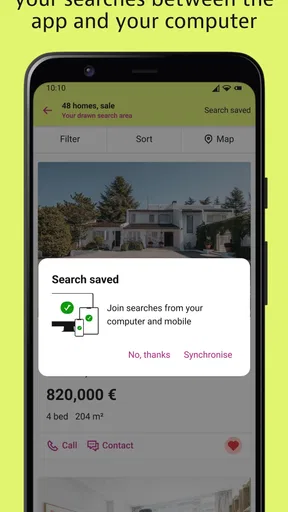
Saving and organizing your favorite listings is also super simple. You can create lists for different criteria—like "must-see," "potential buys," or even "maybe someday"—and access them anytime. This feature really helps in keeping your search organized and focused.
If I am browsing casually, I do not need to turn the app into a full project: I can save a few possibilities and come back when my plans become more definite. If I am actively moving, I would be more disciplined about comparing the same basics across each candidate, especially its area, asking cost, and the practical compromises I would be accepting. That simple habit makes saved items more useful than repeatedly starting fresh searches.
Who will get the most from it
I would recommend it first to someone actively renting or buying in Spain, Italy or Portugal who wants to compare locations as well as individual homes. It also suits people at the planning stage, when the goal is to understand what kinds of options appear in different areas before committing to a shortlist. Its Everyone content rating makes it suitable for a broad audience, though the decisions involved in property searches are obviously matters for adults to handle carefully.
I would skip it if I needed a property search outside those countries, or if I wanted a person to guide the whole process rather than browse listings myself. It is also less compelling for someone who already has a very small set of properties and does not need a searchable marketplace. In those cases, speaking directly with an agency or using a locally focused service may be a better use of time.
The app is free to download, with in-app purchases ranging from $5.49 to $289.99 per item. I would check the purchase details before choosing anything paid rather than assuming it is needed for ordinary browsing. The current version is 14.3.3 and requires Android 8.0 or later, useful compatibility details if you are deciding whether your device can run it.
Community and Support
Another aspect worth mentioning is the community feel. Idealista includes reviews and ratings from previous buyers or renters, which can be invaluable when you're trying to make a decision. It’s like getting advice from a friend who's been there, done that.
If you ever run into issues or have questions, the support team is just a few taps away. They’re responsive and genuinely seem to care about helping you find the perfect place.
Final Thoughts
All in all, idealista is a powerful tool in the world of property searching. With its user-friendly interface, comprehensive listings, and handy features, it makes the daunting task of finding a new home much more manageable—and even enjoyable. Whether you’re actively looking or just browsing, this app is definitely worth a download.
So, if you're in the market for a new place or just want to keep tabs on the property scene, give it a try. Who knows, you might just find your dream home while sipping your morning coffee!
Verdict
Strengths of idealista
- Intuitive user interface, easy to navigate.
- Comprehensive property listings with photos.
- Advanced search filters for specific needs.
- Regular updates with new properties.
- Supports multiple languages for wider access.
Limitations of idealista
- Occasional bugs causing app crashes.
- Limited customer support response time.
- Some listings may be outdated or inaccurate.
- Ads can be intrusive without premium.
- Requires a stable internet connection.
Similar Picks in This Category
View All
Universal TV Remote Control
CodeMatics Media Solutions3.9

AlfredCamera Home Security app
Alfred Systems Inc.4.7

Planner 5D: AI Home Design
Planner 5D4.5

Universal Tv Remote-Cast to TV
One Music Player4.1

Zillow: Homes for Sale & Rent
Zillow Group4.8

99acres Buy/Rent/Sell Property
infoedge.com4.3
Frequently Asked Questions
What is idealista and how does it work?
Idealista is a popular real estate app available for both Android and iOS platforms. It allows users to search for properties for sale or rent across several countries. With its user-friendly interface, users can filter searches by location, price, and property type, making it easy to find the perfect home or investment opportunity.
Is idealista free to use, or are there any costs involved?
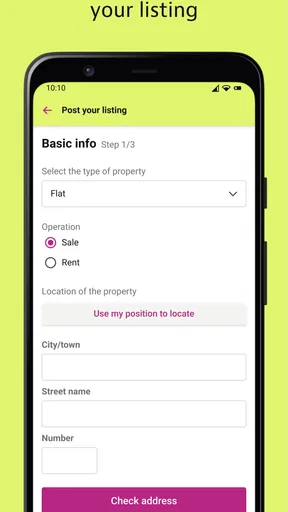
The idealista app is free to download and use for property searches. However, if you're a real estate agent or an individual looking to list a property, there are fees associated with posting advertisements. The app provides different pricing plans depending on the visibility and features desired for the listings.
How accurate are the property listings on idealista?
Idealista strives to provide accurate and up-to-date property listings. However, the accuracy can vary as the information is provided by individual sellers and real estate agents. It's advisable to contact the listing agent or seller directly to verify details and arrange viewings before making any decisions.
Can I save favorite properties and receive notifications about new listings?
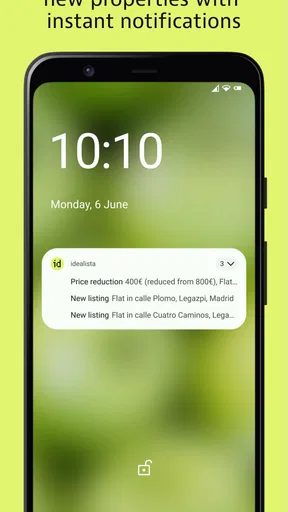
Yes, idealista allows users to save their favorite properties and set up alerts for new listings that match specific criteria. By creating an account, users can personalize their search experience and receive timely notifications about new properties, price changes, or status updates on saved listings.
Does idealista offer customer support if I encounter issues?
Idealista provides customer support through various channels, including email and an online help center. Users can reach out with specific queries or issues they encounter while using the app. The support team aims to respond promptly to help resolve any problems or provide additional information as needed.
